If you are trying to work out how to see who unfollowed you on Instagram, you probably started with a number. Your follower count went down, and now you want to know which name is missing.
A lower count does not always mean that someone chose to go, though. Sometimes a follower deactivated their account, which hides it until they log back in. Other times, Instagram removed a spam account that was following you, and nobody left on purpose.
So how do you find out who really left, without handing your password to an app you know nothing about?
How to See Who Unfollowed You on Instagram: 4 Ways Compared
Can you see who unfollowed you on Instagram? Yes, but only by checking for yourself.
Instagram does not tell you who unfollowed you, and it sends no notification when someone leaves. To check, search for the person in your Followers list, look for your name in their Following list, or compare two exports of your followers taken a few weeks apart.
Your follower count and insights add a fourth signal, but they only show how many people left, never who.
| Method | Effort | How reliable | What it needs |
|---|---|---|---|
| Search your Followers list | Low, one name at a time | Exact for that one person | Their name or username |
| Check their Following list | Low, one name at a time | Exact, if you can open their list | A public account, or a private one you follow |
| Compare two data exports | Medium, two requests and a side-by-side check | Shows every name that left between the two dates | Two exports taken a few weeks apart |
| Watch your count and insights | Very low | Shows how many left, never who | A public account; follower growth needs 100 or more followers |
Knowing who left will not bring them back, so use these checks to spot a pattern and keep most of your effort on getting more followers on Instagram.
Search Your Followers List for One Name
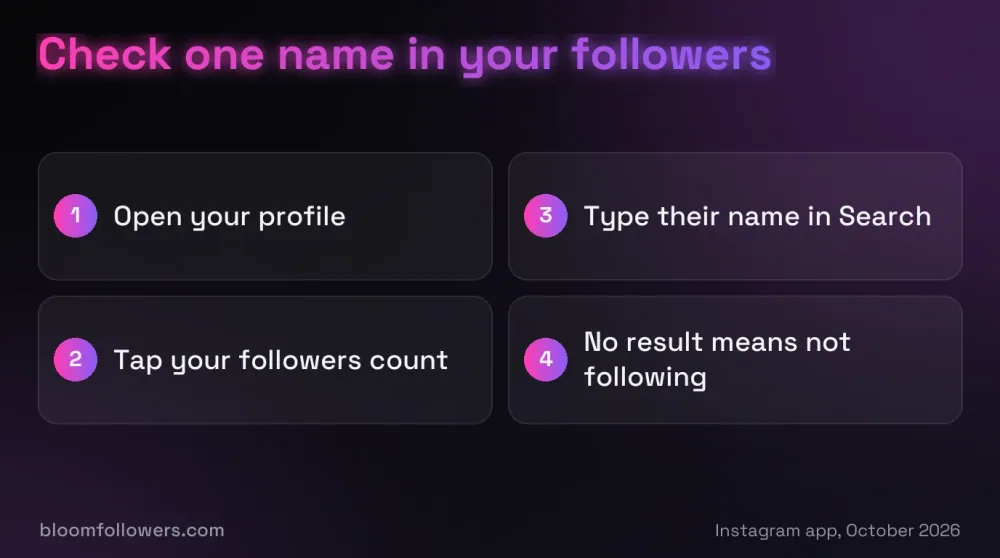
This is the quickest check when one person is on your mind.
- Tap your profile picture in the bottom right to open your profile.
- Tap your followers count at the top.
- Type their name or username into the Search bar.
If they show up, they still follow you. If nothing appears, they no longer follow you, or their account is deactivated for now.
Searching is silent, so they never learn that you checked.
Check Their Following List for Your Name
You can also check from the other side. Open their profile, tap their following count, and search for your own username.
When your name is missing, they no longer follow you. This works on any public account, and on a private account only if you still follow it.
A private account you do not follow keeps both of its lists locked, which is the main tool for hiding followers on Instagram.
How to Check Who Unfollowed You on Instagram Over Time
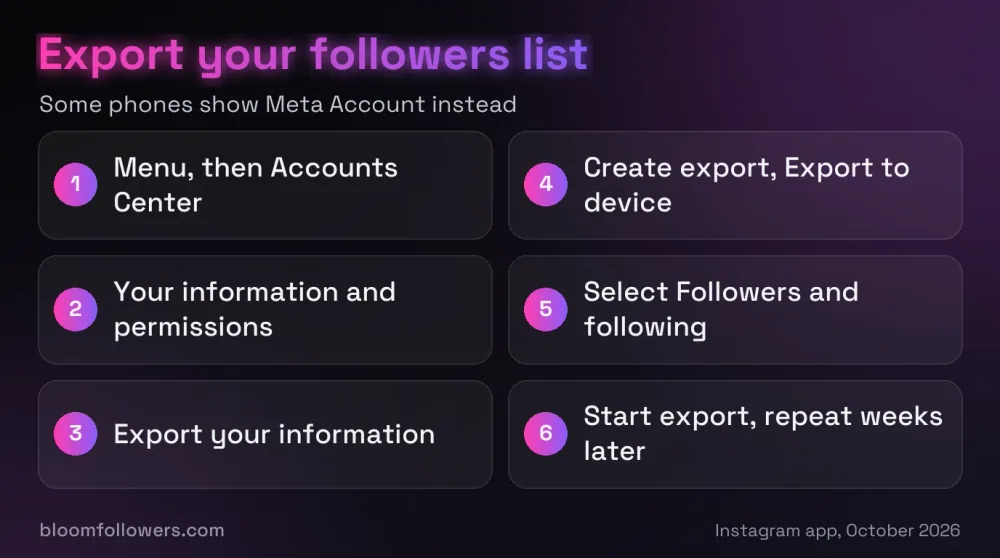
For a full list of names, export your followers twice, a few weeks apart, and compare the files. The tool has been part of Instagram since April 2018 (opens in a new tab), and it is the only official way to save a copy of your follower list.
- Open your profile, tap the menu in the top right, then tap Accounts Center.
- Tap Your information and permissions, then Export your information.
- Tap Create export, pick your Instagram profile, and choose Export to device.
- Select only Followers and following, choose a format, and tap Start export.
Some phones now show Meta Account instead of Accounts Center, because Meta began replacing it in April 2026 (opens in a new tab).
Instagram says the link can take up to 30 days to arrive, and it stays available for 4 days.
Any name in the older file but missing from the newer one has stopped following you, or the account was deactivated in between.
Watch Your Follower Count and Insights
Your count is the first clue, but it only gives you a number.
If your account is public and has at least 100 followers, Instagram's insights show how many followers you gained and lost. You can pick a period within the last 90 days, but names never appear.
Treat a sudden drop as your cue to run the name checks above.
Why Unfollower Apps Ask for Your Instagram Password
Search an app store for who unfollowed me on Instagram, and you will find tracker apps. Some of them want you to sign in with your Instagram username and password.
There is a reason they ask. Instagram's official tools for developers share follower totals, not names, and the connection that personal accounts used was shut down in December 2024 (opens in a new tab). An app that wants your login is reading your account as if it were you.
That gives it far more than your follower list, since Instagram warns that an app holding your login can get complete access to your account. In 2022, Meta found more than 400 apps built to steal logins (opens in a new tab), disguised as photo editors, games and business tools.
BloomFollowers never asks for your password for the same reason: orders for real Instagram followers with a 60-day refill need only your public username.
Watch out: Deleting an unfollower app from your phone does not take back the password you typed into it. Only changing your password does that.
If You Already Gave an App Your Login
Act soon, because the app can keep signing in until you lock it out.
- Change your Instagram password. This signs out every device logged in to your account.
- Turn on two-factor authentication, so a password alone is not enough to sign in.
- Check that the email address and phone number on your account are still yours.
- Remove any linked accounts you do not recognize in Accounts Center.
Do People Get Notified When You Unfollow Them on Instagram?
Instagram keeps unfollows quiet in both directions. Its alerts cover new followers, likes, comments, mentions, messages and live videos, but nothing tells someone that you stopped following them.
If you unfollow someone on Instagram, will they know? Only if they go looking, with the same checks you would use: a search of their Followers list, or a closer look at their count.
Bigger cleanups need more care. If you plan to unfollow dozens of accounts in one sitting, slow down, because Instagram can pause activity that looks automated with a Try again later message. Unfollowing in small batches makes that less likely.
Topping Up Your Follower Count After a Drop
Your follower count sits at the top of your profile, so it is one of the first things a new visitor sees. If a run of unfollows has left your profile looking quieter than your posts deserve, adding followers from real, active profiles is a sensible way to rebuild it.
BloomFollowers delivers them gradually, starting within minutes, and you can spread an order over several days at no extra cost. Every follower order has a 60-day refill guarantee and a 7-day money-back guarantee.
For the best result, keep a posting schedule you can stick to, so new visitors find fresh posts when they arrive.
| Service | Starts at | Good for | Order |
|---|---|---|---|
| Instagram followers | $2.99 for 100 | Rebuilding your count after a wave of unfollows | See follower packages |
| Instagram likes | $1.49 for 50 | New posts that need a stronger first impression | View likes packages |
| Instagram views | $1.99 for 500 | Reels you want more people to watch | Browse views packages |
| Instagram Starter Bundle | $55.99 | Followers, views, likes and comments in one order | Compare bundles |
Lost a few followers? Add followers from real, active profiles, delivered gradually, with a 60-day refill guarantee and no password needed. All we ask for is your public username.
What to Do After Someone Unfollows You on Instagram
That covers how to see who unfollowed you on Instagram: search your Followers list, check their Following list, or compare two exports for the full picture. None of these needs an outside app or your password.
One unfollow rarely means much, since people tidy up their feeds all the time. If the count keeps sliding week after week, work through why you are losing followers before you change anything else.
Who Unfollowed You on Instagram FAQs

Can ChatGPT tell you who unfollowed you on Instagram?
No. ChatGPT cannot open your Instagram account, so it has no way to see who follows you or who left. It can only compare lists you paste or upload yourself, such as two exports of your followers, and doing that shares other people's usernames with another company.
Why won't Instagram show me who unfollowed me?
Instagram has never offered an unfollow list or alert, and no such feature arrived in 2026. The app only notifies you about activity such as new followers, likes and comments. The official ways to check are searching your own Followers list and comparing exports from Accounts Center.
How to find out who unfollowed you on Instagram in 2026?
The checks are the same as before: search the name in your Followers list, look for yourself in their Following list, or compare two exports of your followers. One thing changed in 2026: Meta is moving accounts from Accounts Center to Meta Account, so the export may sit under either name.
How can I check who I unfollowed?
The app has no screen that lists accounts you unfollowed. To track it, export your Following list now and again later, then compare the files: any account in the older file but missing from the newer one is one you unfollowed. Sorting your Following list by date only shows accounts you still follow.
How to know if someone unfollowed you on Instagram without them knowing?
Every check in this guide is silent. Searching your Followers list, opening their Following list or requesting a data export sends no alert to anyone. Instagram notifies people when you follow them, like or comment on their posts, mention them or message them, not when you look at lists.
Does Instagram tell you when someone removes you as a follower?
No. When someone removes you from their followers, Instagram does not notify you, and the same goes for blocks. You would only notice that their posts stopped showing up in your feed, or that you no longer follow them when you open their profile.

Was this helpful?