Your follower count is lower than it was last week. Maybe it slipped by a few accounts, or maybe a whole chunk vanished overnight while your posts looked normal. Instagram does not send a note explaining why.
Some drops mean real people chose to leave, and those are worth fixing. Others have nothing to do with your content, so changing your posts would solve nothing. Before you touch your posting plan, it helps to know which kind of drop you are looking at.
Why Am I Losing Followers on Instagram Right Now?
Follower counts move in both directions every day, even on accounts that are growing.
Quick answer: You lose Instagram followers when Instagram clears out inactive or spam accounts, when you post less or switch topics, or when a viral wave settles. People also unfollow when they tidy up the accounts they follow. Small daily losses are normal. A sharp drop over a day or two often means a cleanup, not real fans leaving.
Each cause below leaves its own pattern, so match yours before you change anything.
Instagram Removed Inactive and Spam Accounts
Instagram regularly removes accounts that are inactive or spam, and every profile they followed loses them at once. In December 2014, one cleanup was so large (opens in a new tab) that Instagram's own account lost almost 19 million followers.
Other cleanups followed. In November 2018, Instagram began removing follows created by third-party growth apps, as TechCrunch reported at the time (opens in a new tab).
By the numbers: On 6 May 2026, Kylie Jenner's account lost 5,071,791 followers in one day, according to Social Blade figures reported by Tyla (opens in a new tab). A Meta spokesperson said the change came from a routine process to remove inactive accounts and that active followers were not affected.
If your drop landed on the same days other creators noticed theirs, a cleanup is the likely cause.
You Posted Less Often
A posting gap gives people fewer reasons to stay. After weeks without a post, followers forget why they followed, and your next post can look like it came from a stranger. Some unfollow on the spot.
Posting in bursts can crowd a feed and push people away too. A steady rhythm is one of the first habits behind how to get more followers on Instagram, because it keeps you in front of people who already chose you.
You Changed Your Topic
People follow an account for a reason, such as recipes, travel tips or one person's daily life. When the posts move to a new topic, people who came for the old one have less reason to stay.
This is the cause where unfollows tell you something real. If the change was an accident, go back to the content that built your audience. If it was a planned pivot, expect a dip while the account finds people who want the new posts.
A Viral Post Brought the Wrong Audience
Instagram shows Reels to followers and non-followers alike, then pushes the best performers to wider groups, as Social Media Today reported in February 2025 (opens in a new tab). One hit can therefore pull in a crowd of people who loved a single video.
Many of them never connect with your usual posts and drift away over the next few weeks. The people who stay are the ones who like what you normally make.
People Are Cleaning Up Who They Follow
Your followers prune their own lists too. In 2020, Instagram added a Least interacted with group to the Following list, which gathers the accounts a person rarely engages with, Social Media Today noted (opens in a new tab). A quiet account is an easy pick from that list.
Some people clear out a long list in one sitting, and others mass unfollow in batches when their feed feels crowded. Losses like these are small, steady and spread across many days.
Follow-for-Follow Accounts Moved On
Accounts that follow you only to get a follow back rarely stay. Once the trade stops paying off, or once they see you never followed back, they unfollow. People who followed to enter a giveaway often do the same after the prize is gone.
Followers From a Low-Quality Seller Dropped
Some sellers fill orders with bot or abandoned profiles. Those are exactly the accounts that cleanups remove, so a low-quality batch can shrink soon after delivery.
Followers from real, active profiles are not what those cleanups target, since Meta said active followers were unaffected in May 2026. Any follower can still leave, which is why we sell Instagram followers with a 60-day refill guarantee at BloomFollowers.
Why Did I Lose Followers on Instagram? Check Your Insights
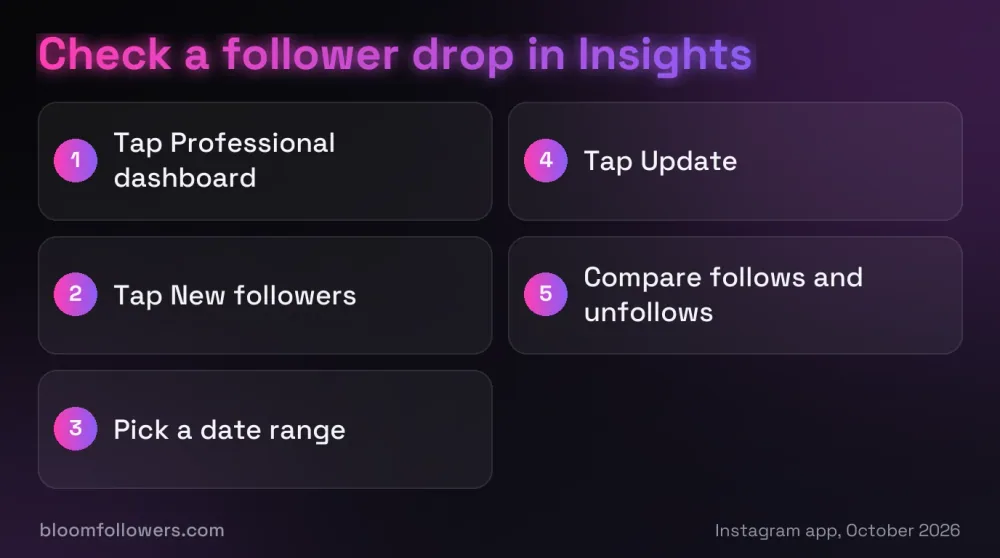
Your Insights screen will not answer why am I losing followers on Instagram in words, but its dates and counts usually point to one cause. These steps match the Instagram app as of October 2026.
Open Your Dashboard
Go to your profile and tap Professional dashboard, or Your dashboard on a public personal account. If the button is missing on a professional account, tap More to open Settings and activity, then tap Insights below For professionals.
Open New Followers and Set the Dates
Tap New followers, then tap the date dropdown. Choose Last 7 days, Last 14 days, Last 30 days, Previous month or Last 90 days, and tap Update. Insights only reach back 90 days, so check soon after a drop.
Compare Follows With Unfollows
The follower screen splits the period into accounts that followed you and accounts that unfollowed you. Meta's own definition of unfollows also counts accounts that left Instagram, so a cleanup shows up here as a spike on one or two days.
A slow, even trickle points to people leaving one by one instead. Insights never shows names, so to see who unfollowed you on Instagram you have to compare your followers list over time.
Check the Count on Your Profile
Before you act, compare Insights with the follower number on your profile. In April 2024, Instagram said a technical issue showed an inaccurate follower loss in Account Insights while profile totals stayed correct. If the numbers disagree, wait a day and check again.
How to Stop Losing Followers on Instagram
Some causes need no fix at all, and the rest need small, steady changes. Find your pattern in the table, then change one thing at a time so you can tell what worked.
| Cause | How to spot it | What to do |
|---|---|---|
| Inactive account cleanup | A sharp drop over one or two days that other creators notice too | Nothing, since those accounts were not watching your posts |
| Posting less | A slow slide during weeks with few or no posts | Pick a schedule you can keep and stick to it |
| Topic change | Unfollows rise after posts on the new subject | Bridge the old and new topics, or accept a short dip |
| Viral post | A spike in follows, then weeks of steady unfollows | Make more of what the viral post did well |
| List cleanups | Small, even losses with no change in your posting | Post things people want to save, share or reply to |
| Follow-for-follow | Losses among accounts that followed you for a follow back | Stop trading follows and let them go |
| Low-quality seller | A bought batch shrinks soon after delivery | Choose real, active profiles with a refill window |
Give each change a few weeks before you judge it, because unfollows from an old problem can keep trickling in. A schedule you can hold for months beats bursts you cannot repeat, and how often to post on Instagram comes down to what you can keep up.
When a Follower Top-Up Makes Sense
A cleanup can take a visible bite out of a small account in a day or two. If new visitors judge you by that number, a top-up from BloomFollowers can bring the count back while your posting rebuilds the rest.
Our followers come from real, active profiles, and delivery is paced gradually. You can spread an order over several days at no extra cost, and we only ask for your public username, never your password.
Bought followers can leave like any others, so every follower order includes a 60-day refill. If followers drop within 60 days, you ask for a free refill from the order page, and every order also has a 7-day money-back guarantee.
| Service | Starts at | Good for | Link |
|---|---|---|---|
| Instagram followers | $2.99 for 100 High Quality followers | Rebuilding a count after a cleanup | See follower packages |
| Instagram likes | $1.49 for 50 High Quality likes | Posts that need early engagement | Browse like packages |
| Instagram views | $1.99 for 500 High Quality views | Reels that need a first push | Check view packages |
| Instagram bundles | $55.99 for the Instagram Starter Bundle | Followers, likes, views and comments in one order | Compare the bundles |
Lost followers in a cleanup? BloomFollowers delivers followers from real, active profiles, gradually, with a free refill if any drop within 60 days. We only need your public username.
Turning Follower Losses Back Into Growth
So, why am I losing followers on Instagram? Usually because of a cleanup of inactive accounts, a quieter posting rhythm, a new topic or a viral wave settling, and only some of those mean real fans left.
Your next step is to open Insights, find the day the drop started and match it to one row of the table. Fix that one cause, keep a schedule you can hold, and judge the result over a month rather than a morning.
Losing Followers on Instagram FAQs

Why am I losing so many followers on Instagram all at once?
A large drop over one or two days often comes from Instagram removing inactive or spam accounts, as it did in early May 2026. Those accounts were not liking or watching your posts, so you lose a number, not an audience. If the drop shows only in Insights and not on your profile, it may be a reporting glitch.
Why did my Instagram randomly remove followers?
Instagram does not pick followers at random. Followers disappear when they unfollow, deactivate or delete their account, or when Instagram removes the account as inactive or spam. Nobody gets a notification when someone unfollows, and Meta counts accounts that left Instagram as unfollows, so the exits can look random even when each one has a cause.
Why do I lose followers when I post on Instagram?
Each new post reminds people that they follow you. Followers who stopped caring about your topic see the post, decide it no longer fits and unfollow. A few losses per post are normal. If every post costs you followers, your recent posts have probably drifted away from what people originally followed you for.
Why do I keep losing followers on Instagram every day?
Small daily losses happen on every account, because people clean up who they follow, leave the app or lose interest. What matters is net growth, meaning new follows minus unfollows. Check both numbers in Insights over the last 30 or 90 days. If follows still beat unfollows, the daily losses are routine.
How do I check who has unfollowed me on Instagram?
Instagram does not show a list of people who unfollowed you. Insights shows how many accounts unfollowed you in a date range, but not who they are. To find names, compare your followers list at two points in time by hand. Avoid any app that asks for your Instagram password to do it for you.

Was this helpful?