Anyone can open a public Instagram account, tap the followers count and scroll through every name on it. That includes an ex, a coworker or a rival business that wants to see who your customers are.
Your following list is just as open, so the accounts you follow are on show too.
If you are looking up how to hide followers on Instagram, the catch is that each setting hides something different. Some of them do not hide your lists at all.
Can You Hide Your Followers on Instagram?
The answer depends on one setting: whether your account is public or private.
Quick answer: Instagram has no setting that hides your followers on a public account. To hide the list, switch to a private account, so only people you approve can see it. Blocking someone stops that one person from seeing your lists, and removing a follower locks them out only if your account is private.
Your follower and following counts are a different story. Instagram treats both numbers as always public, so they stay visible on every account, private ones included.
How to Hide Instagram Followers: Your Options Compared
There are two versions of how to stop people from seeing your followers on Instagram: hiding the list from everyone, or from one person.
Going private handles the first. Blocking handles the second, and it works on public accounts too, which matters if you want to get more followers on Instagram.
| Option | Who stops seeing what | What everyone can still see |
|---|---|---|
| Private account | Everyone you have not approved loses your posts, followers list and following list | Your name, photo, bio and both counts |
| Remove a follower | On a private account, that person loses your posts and lists; on a public one, nothing changes for them | Everything a public profile shows |
| Block someone | That one person can no longer find your profile, posts or lists | Everything, for everyone else |
| Close Friends | People outside the list stop seeing the Stories you share to it | Your posts, lists and counts |
| Restrict | Nobody loses sight of your lists; only their comments and messages are limited | Your posts, lists and counts |
| Hide like counts | Others stop seeing like counts on your posts | Your followers, following and both counts |
How to Make Instagram Followers Private
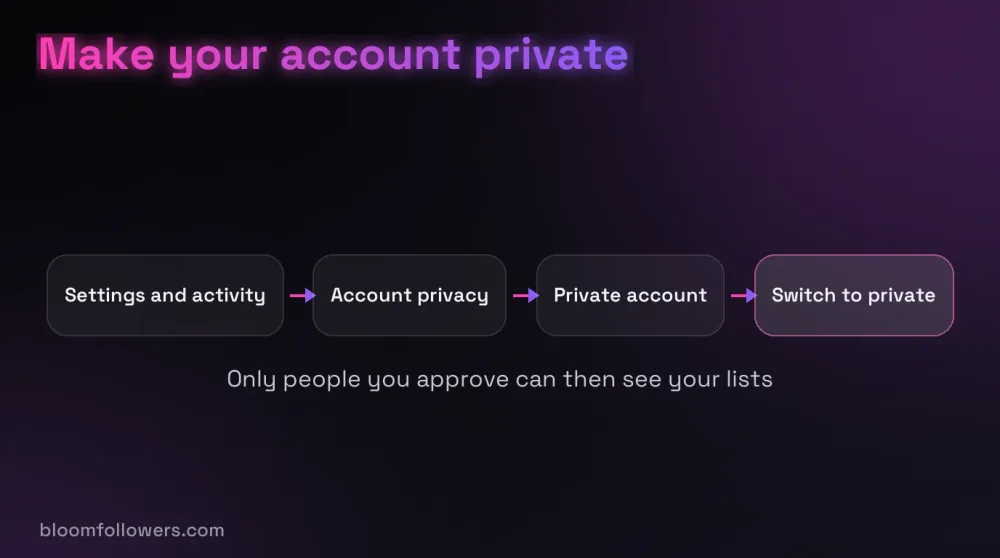
A private account is the only full answer to how to hide your followers on Instagram.
- Open your profile and tap the menu in the top right.
- Under Who can see your content, tap Account privacy.
- Turn on Private account, then tap Switch to private.
From then on, only people you approve can see your posts and both lists. People who already follow you keep that access, so remove anyone you do not want to keep.
Business and creator accounts cannot be private, so switch to a personal account first. If you are under 18, this is already done for you, because Instagram made teen accounts private by default in September 2024 (opens in a new tab).
Try not to flip back and forth, because Instagram may place a temporary limit on accounts that switch between public and private too often.
Remove a Follower Without Them Knowing
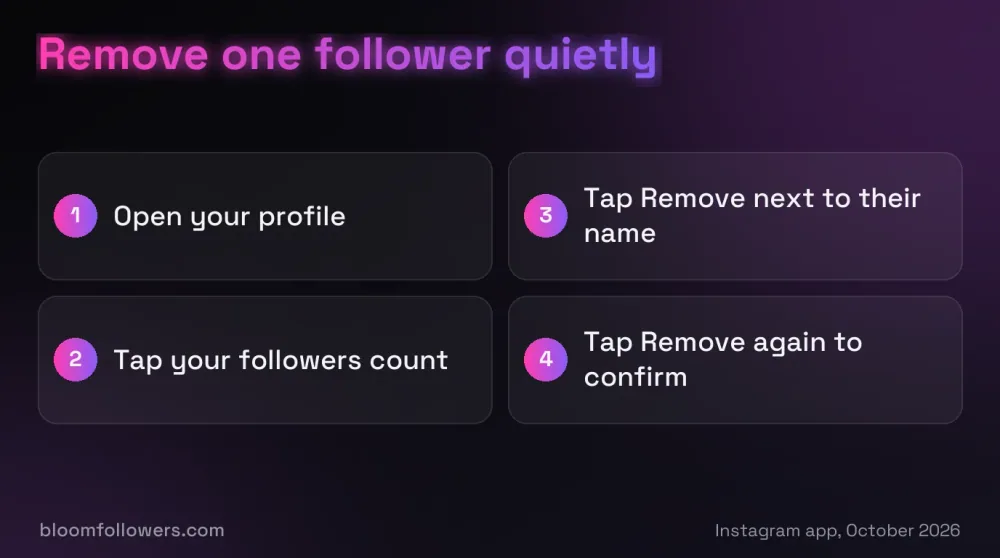
Open your followers list, tap Remove next to their name, then tap Remove again to confirm.
Instagram does not notify them, but they can spot the change with the same checks anyone uses to see who unfollowed them.
What happens next depends on your account. On a private account, they lose your posts and lists until you approve them again. On a public account, they can still see everything and follow you again.
Removing is the quiet answer to how to hide followers on Instagram from friends who already follow you, as long as your account is private.
How to Block People From Seeing Your Followers on Instagram
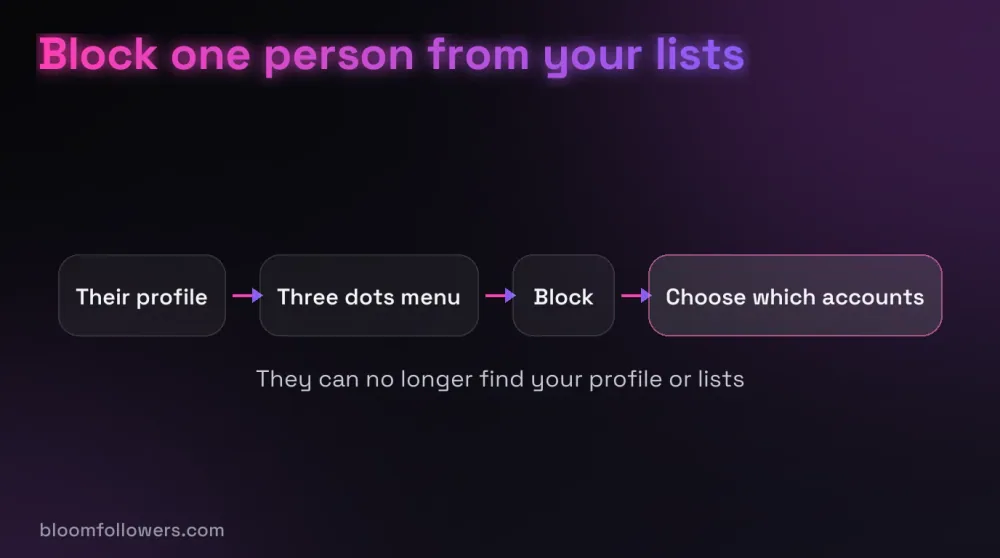
Blocking is the strongest one-person option. Open their profile, tap the three dots in the top right, then tap Block.
Once blocked, they cannot find your profile, so your posts and both lists are out of their reach. Blocking also removes them from your followers, and Instagram does not tell them.
When you block, Instagram offers to block other accounts they have or create, which helps if they use a second profile to look you up.
Keep Personal Stories to Close Friends
Close Friends does not hide your followers, but it controls who sees the Stories you share.
Add people to your Close Friends list, then pick Close Friends when you share a Story. Only people on the list see it, and they can tell from the green ring around your photo.
Nobody can ask to join the list, and you can change it at any time.
What Restrict and Hidden Likes Do Not Hide
Restrict, which Instagram opened to everyone in October 2019 (opens in a new tab), is meant for people you would rather not block outright. Their new comments on your posts are visible only to them, and they cannot see when you are online or have read their messages.
It does nothing to your lists, though, so a restricted account can still scroll your followers on a public profile.
Hidden likes are separate too. In your settings, under Like and share counts, turning on Hide like & share counts removes the numbers from posts you see. Each of your own posts can also hide its like count (opens in a new tab), but neither setting touches your followers.
How to Hide Your Following List on Instagram
Your following list obeys the same rules as your followers list, and there is no separate switch for it.
On a public account, anyone can open it. On a private account, only approved followers can, which makes going private the only way to hide it from everyone.
Myth vs reality: A private account does not make the people you follow invisible. If you follow a public account, your name still appears in its followers list, where anyone can find it.
When the list itself is the problem, make it shorter instead. Unfollowing accounts in small batches is safer than clearing hundreds at once.
Does Hiding Followers Hurt Your Growth?
Going private has a real cost if you want new followers. Your posts stop appearing in search results, Explore, and hashtag and location pages for anyone who does not follow you.
Explore is where the Instagram algorithm shows people posts from accounts they do not follow yet, so losing it cuts off a route strangers use to find you. Public accounts can also be suggested to other people as accounts to follow.
Staying public is also what lets BloomFollowers deliver real Instagram followers, since our packages need a public profile to work.
If growth matters to you, a good balance is to stay public and block the few people you want to keep out.
Growing a Public Profile With Real Followers
Once you have decided to stay public, a stronger follower count helps new visitors take your profile seriously while your posts do the rest.
BloomFollowers adds followers from real, active profiles, paced gradually so your count rises the way it does with normal growth. Each follower order includes a 60-day refill guarantee, plus a 7-day money-back guarantee on the purchase.
We only ask for your public username, never your password, and the Delivery speed step lets you stretch an order over several days for free. Pair it with a plan for your first 1,000 followers, so growth keeps coming after the order is delivered.
| Service | Starts at | Good for | Order |
|---|---|---|---|
| Instagram followers | $2.99 for 100 | A public profile that still looks new | Pick a follower package |
| Instagram likes | $1.49 for 50 | Posts that deserve more visible engagement | Choose a likes package |
| Instagram comments | $8.99 for 10 | Posts that need a conversation started | See comment packages |
| Instagram Starter Bundle | $55.99 | Followers, views, likes and comments in one order | View bundle options |
Keep your profile public and give it a stronger start: we deliver followers from real, active profiles at a gradual pace, backed by a 60-day refill guarantee and a 7-day money-back guarantee.
Choosing How to Hide Followers on Instagram
The choice comes down to who you want to keep out. To hide your lists from everyone, go private and remove anyone who should not keep access. To hide them from one person while staying public, block that person.
Before you go private, open your insights and check how many of the accounts engaging with your posts are non-followers. A private account shows its posts to followers only, so that is the reach you would give up.
Hiding Instagram Followers FAQs

Can someone hide their Instagram following list?
Only by making their account private. On a private account, the following list is visible to approved followers only, while anyone can still see the following count. Public accounts have no setting that hides the list, so if you can open someone's following list, their account is public or you follow them.
Can I restrict someone to see my followers on Instagram?
No. Restrict limits a person's comments and messages and hides when you are online, but it does not hide your followers or following list. To keep one person away from your lists, block them, or make your account private and remove them as a follower.
Why can't I see followers on someone's Instagram?
Usually the account is private and you do not follow it, so only the follower count shows. You also cannot open the lists of an account that blocked you, because its profile will not appear for you at all. A deactivated account stays hidden until its owner logs back in.
Can you hide your friends list on Instagram?
Instagram has no friends list in the Facebook sense. The closest things are your followers and following lists, which you can hide only by going private, and your Close Friends list, which is never shown on your profile. People on it can tell from the green ring on your Stories.
How do I hide my followers on Instagram without going private?
You cannot hide them from everyone while staying public. What you can do is block specific people, which stops them from finding your profile and lists. Removing a follower on a public account does not help, because that person can still open your lists and follow you again.
How to unhide followers on Instagram?
Switch your account back to public: open your profile, tap the menu, tap Account privacy and turn off Private account. Your lists become visible to everyone again, and pending follow requests are approved when you go public. Anyone you blocked can be unblocked from the Blocked list in your settings.

Was this helpful?