
One Instagram post can sit on two profiles at the same time, with both names at the top and one shared count of likes and comments. It goes out to both sets of followers, and nobody has to post it twice.
There is a catch, though. Your partner has to accept, and a few rules decide who you can invite, which formats work and what happens if one of you changes your mind later. Get those wrong, and the post may land on one profile instead of two.
How to Do a Collab Post on Instagram, Step by Step
You will find the option inside the normal posting flow, on the same screen where you tag people.
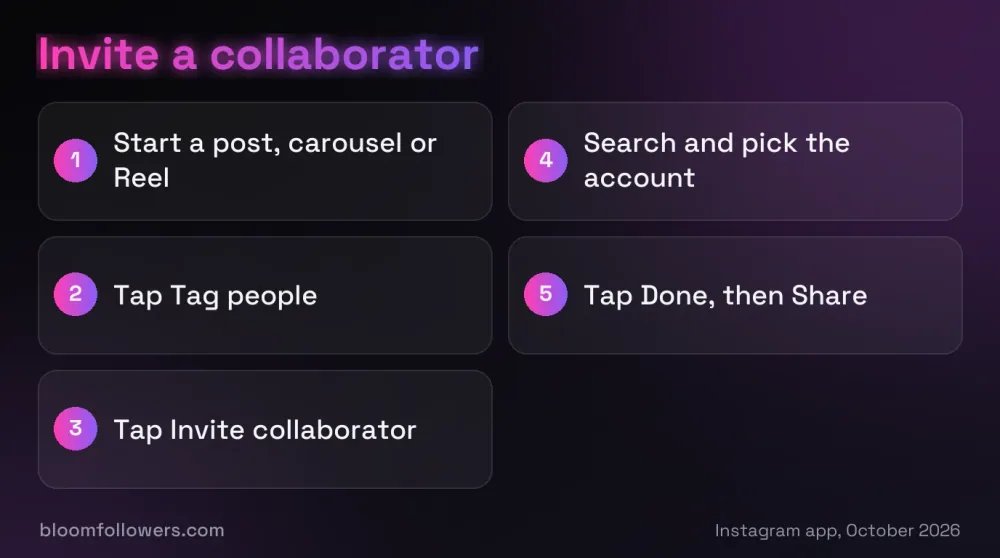
Quick answer: How to do a collab post on Instagram: start a post, carousel or Reel, tap Tag people, choose Invite collaborator and pick the account. Once they accept, the post shows on both profiles and shares one set of likes and comments, so both audiences see it at once.
Step 1: Start a Post, Carousel or Reel
Create the post the way you normally would: pick your photos or video and edit them. Collabs work on feed posts, carousels and Reels, but not on Stories, which can only mention other accounts.
Agree on the caption with your partner first, along with the five hashtags you will both use, since one caption serves both audiences.
Step 2: Tap Tag People, Then Invite Collaborator
On the last screen before you share, tap Tag people, then tap Invite collaborator. This is not the same as a normal tag. Tagging someone does not share the post with their followers, but an accepted collaborator does.
Step 3: Search for Each Account and Tap Done
Type each username, tap the right account and tap Done. You can add up to five collaborators to one post, so six accounts can share it in total.
Public accounts can invite anyone. A private account can only invite people who follow it, and its first invite shows a note explaining who will be able to see the post.
Step 4: Share and Wait for the Accept
Tap Share. Your post goes live straight away, and each collaborator's name is added only after they accept.
Because two audiences see the same upload, post it at the best time to post on Instagram for both of you, not just for your own followers.
How to Accept a Collab Invite
Sending the invite is only half of how to make a collab post on Instagram. Nothing changes on the other profile until that account says yes.
Accept or Decline the Invite
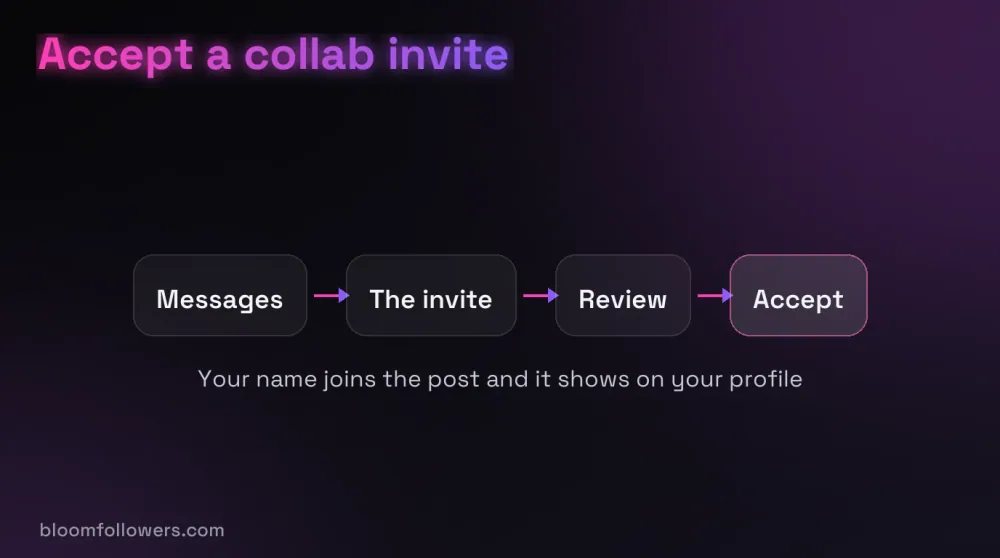
Invites arrive as a message. Tap the messages icon at the top right of your feed, open the chat with the invite, tap Review, then tap Accept or Decline.
Once you accept, your username joins the post, it appears on your profile and it goes out to your followers. Everyone sees one shared view count, like count and comment thread.
Remove Yourself or a Collaborator Later
Either side can end it at any time. A collaborator can remove themselves, and the creator can remove a collaborator. The post stays on the original creator's profile, and only they can delete it, which also removes it from every collaborator's profile.
Collab Post Rules and Limits
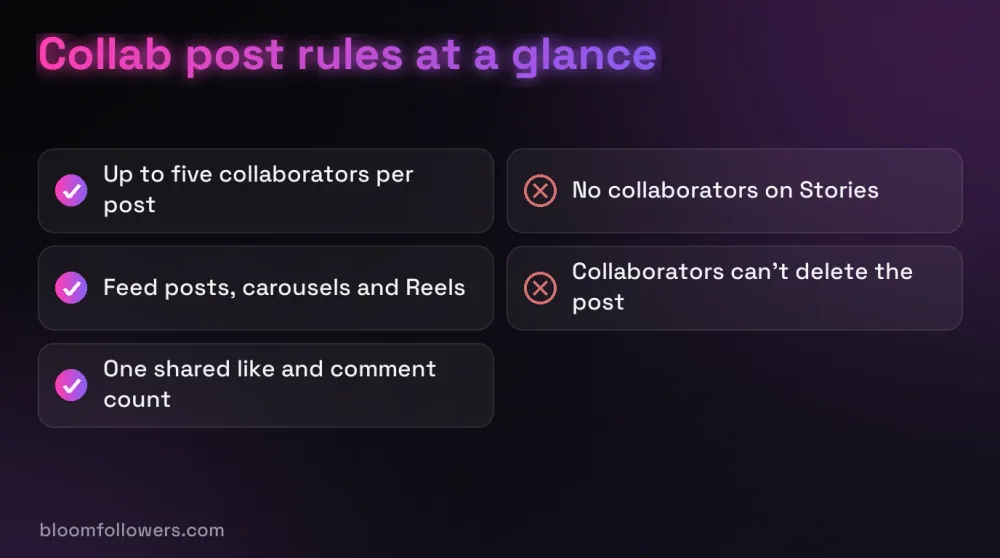
Collabs arrived in October 2021 (opens in a new tab) with room for a single collaborator.
Instagram raised that to three in July 2023 (opens in a new tab), and its help page now allows five.
| Rule | What Instagram allows (October 2026) |
|---|---|
| Collaborators per post | Up to five, plus the original creator |
| Formats | Feed posts, carousels and Reels; Stories can only mention accounts |
| Private accounts | Can invite only accounts that follow them |
| Private creator, public collaborator | The post becomes public through the public account |
| Likes, views and comments | One shared count and one comment thread |
| Leaving or removing | Either side can end it at any time |
| Deleting the post | Only the original creator, and it disappears from every profile |
| Blocking | Ends the collab; the post stays with the creator |
| Inviting after posting | Possible on Reels since July 2024; on photo posts, check Edit first |
| Paid deals | Add the paid partnership label as well |
A paid deal needs the paid partnership label on top of the collab invite. If a brand pays you or sends free products, the FTC says to disclose the relationship yourself (opens in a new tab) too, not rely only on a platform's tool.
Who to Collab With to Grow
Collabs put your post in front of people who already follow someone like you. That makes them a direct way to get more followers on Instagram, as long as both audiences would care about the post.

A possible partner will likely check your profile before saying yes, and BloomFollowers' Instagram growth bundles add followers, views, likes and comments to it in one order.
Brands lean on the feature heavily. More than 73% of brands on Instagram use collabs, and Reels see the strongest gains from them, according to Emplifi data reported in September 2026 (opens in a new tab).
A Creator in a Neighboring Niche
Look for someone whose followers would enjoy your posts without seeing the same thing twice. A running coach and a sports nutritionist fit, and so do a travel photographer and a food creator from the same city.
A Local Business Next Door
Two local businesses can share one post about something they do together, such as a cafe and the bakery that supplies it. Both sets of local followers see it, and each crowd gets a reason to visit the other shop.
How to Collab Post on Instagram With a Brand
Let the creator publish and invite the brand, rather than the other way round. In the same Emplifi data, posts published this way reached more than five times the amplification of regular posts in ecommerce and retail.
Not every account will say yes to a collab. When one declines, reposting their post can still share it with your followers and keeps their name on it.
Making Your Profile Worth the Visit
A collab sends new people to your profile, and what they find there decides whether they follow. A new profile with few followers and quiet posts gives them little reason to stay.
Can paid growth help? For a new account or a launch, yes. The BloomFollowers Instagram Starter Bundle combines 1,000 followers, 5,000 views, 1,000 likes and 10 comments, with the followers coming from real, active profiles.
Delivery starts within minutes and runs gradually, every follower order has a 60-day refill guarantee, and every order has a 7-day money-back guarantee. We never ask for your password, only your username or post link.
| Service | Starts at | Good for | Link |
|---|---|---|---|
| Instagram bundles | $55.99 (Starter Bundle) | Followers, views, likes and comments before a big collab | Compare Instagram bundles |
| Followers | $2.99 for 100 | A profile collab visitors take seriously | Choose follower packages |
| Likes | $1.49 for 50 | Your own posts around the collab | Browse like packages |
| Comments | $8.99 for 10 | Posts that need conversation | See comment packages |

Planning a collab with a bigger account? The BloomFollowers Instagram Starter Bundle puts followers, views, likes and comments on your profile in one $55.99 order, with gradual delivery, a 60-day follower refill and a 7-day money-back guarantee.
Planning Your First Collab Post on Instagram
That is how to do a collab post on Instagram: start the post, invite up to five collaborators from Tag people, and wait for each to accept. Agree on the caption and timing first, and add the paid partnership label when money or free products are involved.
Your next step is a short list. Write down three accounts whose followers would enjoy your posts, then send one of them a message with a post idea you could make together.
How to Do a Collab Post on Instagram FAQs

How many collaborators can you have on an Instagram post?
Up to five, according to Instagram's help page in October 2026, so six accounts can share one post. The limit has grown over time: Collabs started with a single collaborator in 2021 and allowed three from July 2023. Each invited account still has to accept before its name appears on the post.
Can you add a collaborator on Instagram after posting?
On Reels, yes: Instagram added after-posting invites in mid-2024, through Edit, Tag people and Invite collaborator. For photo posts, Instagram's help page only describes inviting while you create the post, so check the Edit screen first. If the option is missing there, the invite has to go out before you share.
Can a private account do a collab post on Instagram?
Yes, with limits. A private account can invite only people who follow it, and Instagram shows a note about who can see the post on the first invite. If a public account accepts, the post becomes public through that collaborator, so make sure you are happy with that before you send it.
Do both accounts get the likes on a collab post?
Yes. A collab post has one shared like count, one view count and one comment thread, and every collaborator sees the same totals. Two audiences react to the same upload, so the numbers are combined in one place rather than split across two separate copies of the post.
Why can't I add a collaborator on Instagram?
Check four things first. Stories can't have collaborators, a private account can only invite its followers, a post holds at most five collaborators, and a block between the two accounts ends any collaboration. If none of these apply, update the app and try the invite again from Tag people.

Was this helpful?